Bingo Win™: Classic Bingo Game
Bingo Casino GamesBoard
4.52.94K Reviews
- Version
- 1.5.7
- Installs
- 1.00M
- Age Rating
- Teen
Screenshots






Our Review of Bingo Win™: Classic Bingo Game
 Analysis by Appyee
If you've ever found yourself with a sudden craving for the excitement of bingo, but not quite ready to head out to a bingo hall, then Bingo Win™: Classic Bingo Game might just be your next favorite app. I decided to give it a whirl and, let me tell you, it was quite an experience.
When a quick game fits the day
What makes a bingo app useful in everyday life is not only whether it looks lively, but whether it suits the small pockets of time people actually have. I’d consider this one when I want a casual game at home or a brief distraction while waiting somewhere, rather than a demanding session that needs a long stretch of concentration. Its mix of live rooms and daily credits gives it a reason to revisit, though I’d treat the daily reward as a small extra, not a reason to open the game when I don’t have time to play.
A realistic routine might be checking in during a quiet break, collecting the daily credits, and deciding whether there’s enough time for a round. If I’m already in a hurry, I’d skip starting a game: bingo asks you to watch the calls and mark cards, and stepping away mid-round can spoil the point of playing. The useful habit is to choose a room and card load that match the attention I can give, rather than trying to squeeze in the busiest session every time.
Choosing a pace that stays comfortable
The multi-card option is the most important choice for controlling the pace. More cards can make a round feel busier, but they also demand more attention; they are not automatically the better choice for a relaxed player. I’d begin with a manageable setup, learn how quickly I can follow the calls, and only add complexity if marking feels comfortable. That approach is especially helpful on a smaller screen, where scanning several cards may take more effort than it does on a larger display.
There’s a trade-off between the social energy of a live room and the calm of playing alone. Chat and other players can make a round feel more like a shared event, but they may also compete for attention when numbers are moving quickly. If I’m trying to keep track of cards, I’d prioritize the game itself and treat conversation as optional. For someone who mainly wants a quiet puzzle-like pastime, a traditional offline bingo game may be a better fit than a room built around other players.
Getting Started with Bingo Win™
First things first, downloading Bingo Win™: Classic Bingo Game is a breeze. Whether you’re on an Android or iOS device, the app is right there waiting for you in the app store. Once installed, I was greeted with a vibrant and colorful interface that immediately made me feel like I was about to dive into a bingo bonanza. The layout is intuitive and user-friendly, which means you can jump right into the action without having to fumble around trying to figure out what to do next.
Speed, focus, and busy rounds
In a bingo game, perceived speed is less about how quickly an app opens and more about whether the calls and card-marking feel easy to follow. Here, the numbers can move fast enough that multi-card play becomes a real attention test. I wouldn’t recommend starting with several cards while also trying to chat or handle another task. A calmer first session lets you learn the rhythm, and a focused session makes it easier to enjoy the competitive side without feeling overwhelmed.
The busiest moments are likely to be rounds where I’m tracking multiple cards while other players are active in the room. That is where a colorful interface can help make the experience inviting, but visual activity can’t replace concentration. I’d avoid playing while walking, crossing a street, or doing anything that needs my attention. For a low-pressure break, one card or a lighter setup is the sensible choice; for a more intense session, I’d set aside time to watch the game properly.
Gameplay and Features
As expected, the core of the app lies in its bingo gameplay. The game offers a variety of bingo rooms, each with its unique theme and style, which adds a nice touch of variety. Whether you’re in the mood for a classic bingo experience or something with a bit more flair, there’s a room for you. And if you’re feeling lucky, you can even join special events that pop up now and then.
Its travel-themed presentation and Lucky Wheel give the broader experience more to do than simply joining one room and repeating the same round. I’d use the rooms as the main activity and see the wheel as a side attraction, not as a substitute for playing bingo. The daily credits also give returning players a small reason to check in, but they don’t change the central decision: the appeal depends on whether you enjoy following live calls and playing alongside other people.
For anyone comparing it with other board games, this is a more social and chance-driven choice than a strategy game that rewards planning several moves ahead. Compared with a simple offline bingo app, the live-room atmosphere and extra activities may feel more engaging, while also making the experience busier. If I wanted a game that works entirely at my own pace, I’d choose a solo alternative. If I wanted the familiar bingo format with a sense of a shared room, this game’s approach makes more sense.
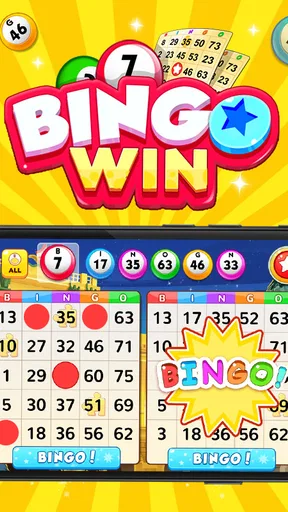
One of the standout features for me was the multi-card play, allowing you to handle multiple bingo cards at once. It’s a bit of a challenge if you’re not used to it, but once you get the hang of it, it’s a fantastic way to increase your chances of winning. Just keep your eyes peeled, because those numbers fly by fast!
Credits, purchases, and sensible expectations
Winning isn’t the only reason to pay attention to the game’s rewards. Credits and the Lucky Wheel add a progression layer, but I’d keep a clear distinction between free play incentives and optional spending. The game is free to download, with in-app purchases ranging from $0.99 to $99.99 per item. That wide range makes it worth checking the purchase details carefully before confirming anything, especially if a younger player uses the device. I’d set a spending boundary in advance and never treat a purchase as a way to guarantee a win.
The game is rated Teen, so I’d take that age guidance into account when deciding whether it suits a younger player. It is also a good idea to consider how much time a player is comfortable spending in a game that offers daily rewards and competitive elements. Those features can make a return visit tempting; they work best as light extras rather than obligations. If I don’t want a game that encourages regular check-ins or offers optional purchases, a simpler offline bingo title may be a better match.
Winning isn’t just about shouting "Bingo!" here. The game showers you with rewards for every win, which you can use to unlock even more exciting rooms and features. Plus, there are daily bonuses just for logging in, so it’s worth checking in every day even if you don’t have time for a full game. There are also achievements to unlock, which add another layer of fun and satisfaction.
Social play without losing the thread
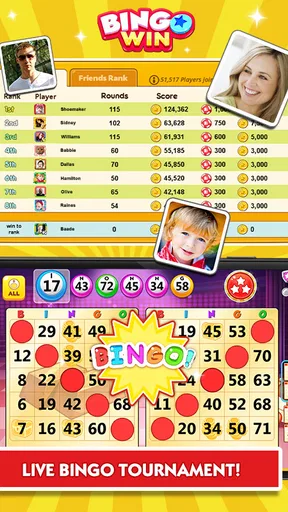
The social side is most appealing when I’m in the mood to share the moment rather than simply fill a spare minute. Chat can make the room feel lively, and leaderboards offer a way to compare progress, but neither is essential to understanding the basic bingo loop. A newcomer can focus on the calls first, then explore the social features once the pace feels familiar. That order helps keep the first few rounds from becoming a jumble of cards, conversation, and competition.
If I’m choosing this for a friend, I’d recommend it to someone who likes bingo’s mix of luck, quick decisions, and light social contact. I’d steer a player toward another game if they want complete quiet, deeper strategy, or no optional purchases. There’s no single best style of bingo for everyone: the advantage here is the livelier room-based feel, while a basic solo game is better for uninterrupted play and a more predictable pace.
If you’re playing with friends, it’s worth agreeing on what you want from a session before opening the chat. Some people want to talk throughout the round; others prefer to concentrate and celebrate only when someone wins. The in-game conversation is a bonus, not a requirement, so I’d use it when it makes the room more fun and ignore it when it distracts from the calls. That small choice can make a shared session feel much less hectic.
Graphics, device fit, and reliability
Visually, the app is a treat. The graphics are sharp and colorful, making each game feel vibrant and engaging. The sound effects and background music are upbeat without being intrusive, adding to the overall atmosphere of excitement.
For a comfortable experience, I’d make sure the device can run a current app version and that the screen is large enough for me to read cards without strain. The listed minimum operating-system requirement is 7.0, and the current version is 1.5.7. Those details are practical checks before installing, particularly on an older device; they don’t by themselves promise that every device will feel equally quick. If storage or battery life is already a concern, I’d also avoid keeping a visually active game open longer than I need to.
I wouldn’t make strong claims about speed or stability across every phone. In normal use, what matters to me is whether the calls remain easy to follow and whether the round feels responsive enough to mark cards comfortably. If a session is interrupted by a call or a change of app, I’d return as soon as practical and check the game state before assuming progress has been preserved. That is a sensible habit for any live round, especially when several cards are in play.
The game has been available since August 16, 2017, and it is made by Bingo Casino Games. Its average rating is 4.5 from around 19,000 ratings, alongside roughly 2,900 written reviews, and it has over one million installs. Those figures suggest that it has found an audience, but they cannot tell me whether its pace, social features, or purchase options will suit a particular player. I’d use them as context, then decide based on the kind of bingo experience I actually want.
If a round feels too busy, I’d first simplify how I’m playing rather than assume I need to push through: reduce the number of cards, mute distractions outside the game, and leave chat for a quieter moment. If the issue is a device that struggles with games generally, a simpler bingo app is likely the more comfortable option. That’s the practical dividing line for me: this title makes the most sense when its colorful, social setup adds enjoyment rather than making a casual game feel like work.
Final Thoughts
All in all, Bingo Win™: Classic Bingo Game offers a delightful blend of classic bingo fun with modern twists. It’s easy to pick up, yet offers enough variety and challenge to keep you coming back for more. Whether you’re a bingo veteran or a curious newcomer, this app is bound to entertain. So, grab your virtual bingo card and get ready to shout "Bingo!" from the comfort of your own home.
Happy bingo-ing, and may the odds be ever in your favor!
Verdict
Strengths of Bingo Win™: Classic Bingo Game
- Engaging graphics and sound effects.
- Variety of bingo rooms to explore.
- Daily bonuses enhance gameplay.
- Smooth performance on most devices.
- No intrusive ads during gameplay.
Limitations of Bingo Win™: Classic Bingo Game
- In-app purchases can be pricey.
- Requires internet connection.
- Limited free credits per session.
- Occasional connectivity issues.
- Lacks offline mode option.
Similar Picks in This Category
View All
Ludo King®
Gametion4.1

Ludo
Yarsa Games4.6

Tile Master® - Matching Game
Higgs Studio3.6

Checkers Online
CC Games4.6

Dominoes
Loop Games4.7

Chess
Chess Prince4.6
Frequently Asked Questions
What is Bingo Win™: Classic Bingo Game about?
Bingo Win™: Classic Bingo Game is a digital version of the classic bingo game that offers players an exciting and interactive experience. It allows users to play multiple bingo cards simultaneously, engage in live tournaments, and enjoy various themed rooms. The game also includes daily bonuses and rewards to enhance the gameplay.
Is Bingo Win™: Classic Bingo Game free to play?
Yes, Bingo Win™: Classic Bingo Game is free to download and play. However, it does offer in-app purchases for players who wish to enhance their gaming experience with additional features, power-ups, or to progress more quickly. These purchases are optional and not necessary to enjoy the game.
Can I play Bingo Win™: Classic Bingo Game offline?
Bingo Win™: Classic Bingo Game requires an internet connection to play, as it features live tournaments and multiplayer options. The game is designed to provide a social experience, allowing players to compete against others in real-time, which necessitates being online.
What are the system requirements for Bingo Win™: Classic Bingo Game?
Bingo Win™: Classic Bingo Game is compatible with most modern Android and iOS devices. It requires Android 5.0 or later and iOS 10.0 or later. The game is optimized for both phones and tablets, providing a smooth experience across different devices. Ensure your device has sufficient storage and RAM for optimal performance.
How can I earn bonuses and rewards in Bingo Win™: Classic Bingo Game?
Players can earn bonuses and rewards by logging in daily, completing bingo cards, participating in tournaments, and achieving specific goals within the game. The game offers various events and challenges that provide additional opportunities to collect rewards, which can be used to purchase power-ups or unlock new content.
Play our best games!


